

Materials
- Original paper: https://arxiv.org/pdf/1712.05889
- Textbook: https://maxpumperla.com/learning_ray/ch_01_overview/
introduction
Ray is currently the standard distributed computing framework for Python.
- Created at Berkeley Sky Computing Lab, monetized by the Ion Stoica gang (of Databricks fame) via Anyscale.
- Optimized for ML applications:
- Fine-grained, large scale computations (i.e. simulations or training steps)
- Heterogeneity in time (allow parallel operations to take milliseconds or hours) and compute (support CPU+GPU+TPU simultaneously)
- Dynamic executions (i.e., reinforcement learning)
- Must coordinate millions of concurrent tasks across thousands of machines in a reasonably fault tolerant manner
- Can either sit on top of Kubernetes (kuberay) or deployed bare metal (SkyPilot, Anyscale, etc.)
- Since Python is currently the lingua franca of ML research, Ray is the global standard platform for training and serving models (for now).
What is novel about Ray?
In the authors’ words:
- We design and build the first distributed framework that unifies training, simulation, and serving— necessary components of emerging RL applications.
- To support these workloads, we unify the actor and task-parallel abstractions on top of a dynamic task execution engine.
- To achieve scalability and fault tolerance, we propose a system design principle in which control state is stored in a sharded metadata store and all other system components are stateless.
- To achieve scalability, we propose a bottom-up distributed scheduling strategy.
In my words:
- Ray, like many SOTA systems, feels obvious in hindsight- there isn’t any one crazy new innovation. Rather, there are a few key architecture decisions (GCS, the node/actor/worker abstractions, the local/global schedulers…) that all come together to make one platform that works far better than any existing solution.
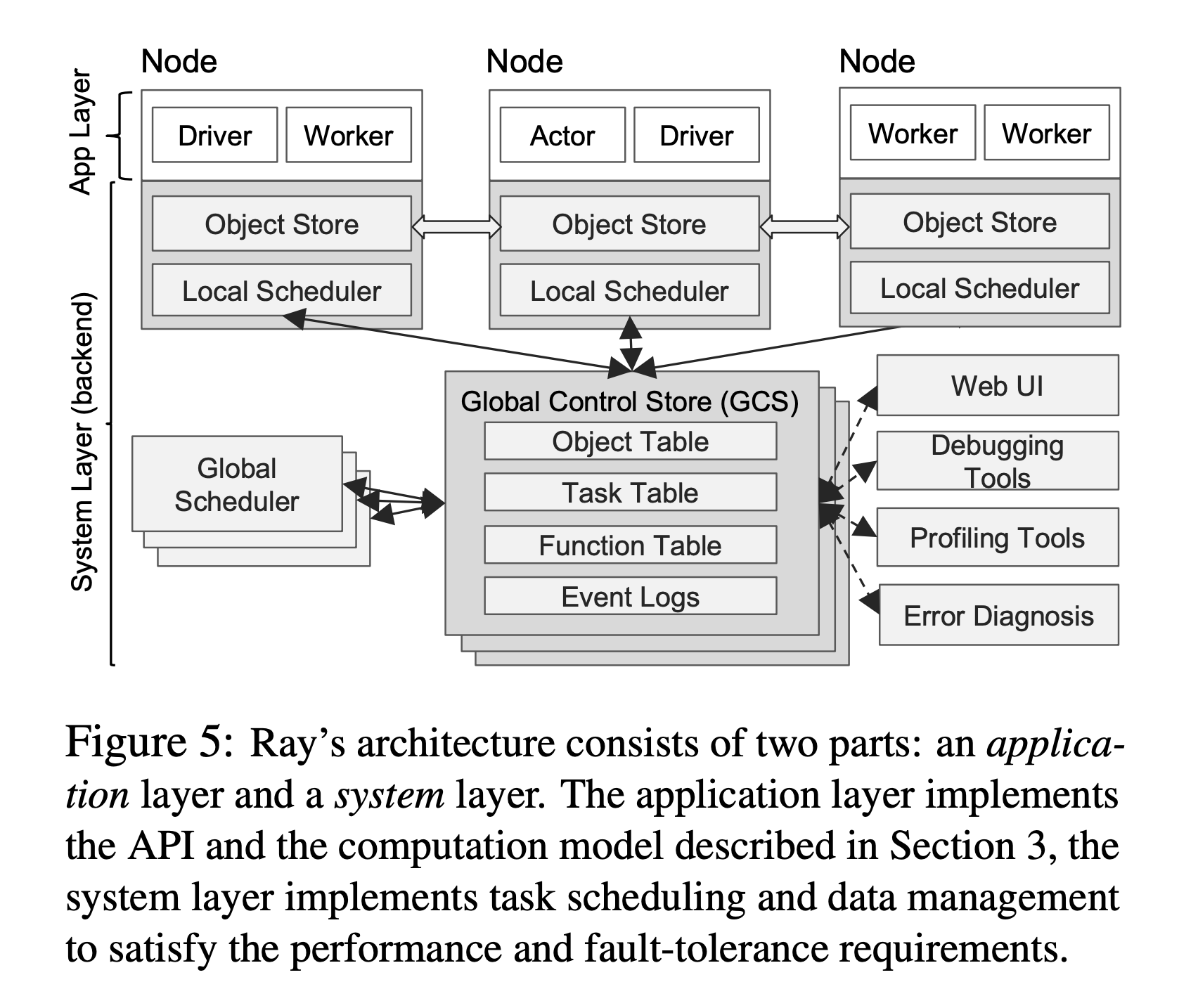
In contrast with SDNs, BOOM, and GFS, Ray decouples the storage of the control plane information (e.g., GCS) from the logic implementation (e.g., schedulers). This allows both storage and computation layers to scale independently, which is key to achieving our scalability targets.
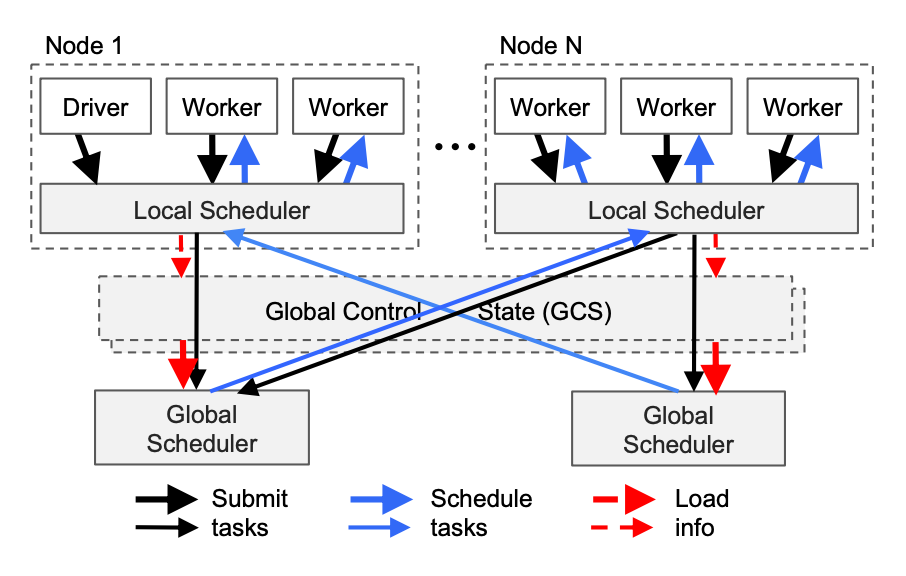
Key Concepts
Actors
Actors extend the Ray API from functions (tasks) to classes. An actor is essentially a stateful worker (or a service). When you instantiate a new actor, Ray creates a new worker and schedules methods of the actor on that specific worker. The methods can access and mutate the state of that worker. Like tasks, actors support CPU, GPU, and custom resource requirements.
See the User Guide for Actors.
Ray Clusters
https://docs.ray.io/en/latest/cluster/key-concepts.html#id3
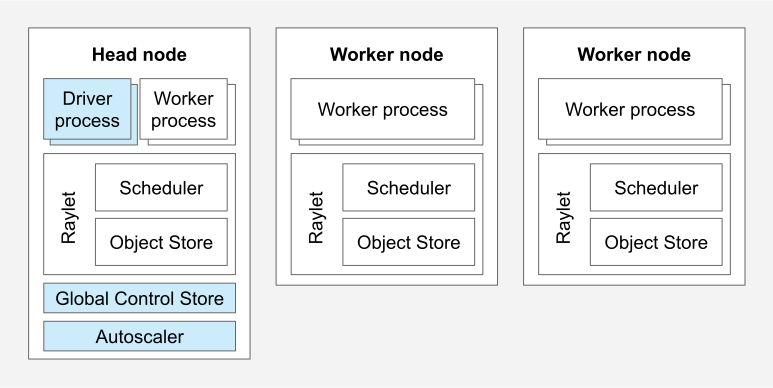
A Ray cluster consists of a single head node and any number of connected worker nodes:
Head Nodes
https://docs.ray.io/en/latest/cluster/key-concepts.html#id4
Every Ray cluster has one node which is designated as the head node of the cluster. The head node is identical to other worker nodes, except that it also runs singleton processes responsible for cluster management such as the autoscaler, GCS and the Ray driver processes which run Ray jobs. Ray may schedule tasks and actors on the head node just like any other worker node, which is not desired in large-scale clusters. See Configuring the head node for the best practice in large-scale clusters.
Worker Nodes
https://docs.ray.io/en/latest/cluster/key-concepts.html#id5
Worker nodes do not run any head node management processes, and serve only to run user code in Ray tasks and actors. They participate in distributed scheduling, as well as the storage and distribution of Ray objects in cluster memory.
Ray Jobs
https://docs.ray.io/en/latest/cluster/key-concepts.html#id7
A Ray job is a single application: it is the collection of Ray tasks, objects, and actors that originate from the same script. The worker that runs the Python script is known as the driver of the job.
Deploying and Using Ray
If you want to pay someone else lots of money to manage Ray for you, refer to anyscale.
If you want to use Ray for free, it’s open source: https://github.com/ray-project/ray. It’s fairly straightforward to spin up a local (single-machine) Raycluster to develop on. This example is a good place to start: https://docs.ray.io/en/latest/ray-core/examples/map_reduce.html
You can customize ray.init() either with direct parameters, or by passing in a configuration like this.
Kuberay
If you want to use Ray in a production environment, installing kuberay on top of an existing Kubernetes cluster is the way to go. Kuberay offers convenient CRDs like RayJob that allow you to customize how jobs are deployed.
By default (using K8sJobMode), starting a RayJob on Kuberay will create the following:
- A head pod, which contains the GCS and other global resources that all workers need to talk to.
- If you’re launching a lot of workers, you may be bottlenecked by worker-to-head communications. Ensure your
ulimitand other configurations are set correctly, and you should launch your head pod as close to your workers as possible (in the region/zone/datacenter etc.)
- If you’re launching a lot of workers, you may be bottlenecked by worker-to-head communications. Ensure your
- A submission pod, which is responsible for telling the workers what to run and collecting their stdouts/stderrs.
- The submission pod will provide most of the useful logging for your RayJob, so you should default to tailing this.
- A very recent / upcoming feature of Kuberay is the
SidecarMode, which launches the submission pod as a sidecar container of the head pod. This is still mostly experimental and still has some issues, so I would recommend holding off until it becomes stable.
- Some number of worker pods, which will automatically be scheduled on available nodes for you.
- Workers will be stuck in
Pendingif they cannot be scheduled due to resource exhaustion, taints, or other constraints. This is OK and will not block your Ray Job from starting as long asmin_workersin your raycluster/ray.init()configuration is less than the current number of available workers.
- Workers will be stuck in
If you need priority classes and other fine-grained controls over how jobs and workers are scheduled, consider using kueue.
Observability
By default, both Ray and Kuberay will emit OpenTelemetry metrics. One way to collect these metrics is to set up a Prometheus instance.
If you’re on Kuberay, you can enable metrics at installation time with something like:
helm template kuberay-operator kuberay/kuberay-operator --version 1.5.0 --set metrics.serviceMonitor.enabled=true --set metrics.serviceMonitor.selector.release=prometheus
This will automatically install a ServiceMonitor for you.
You might also want to install these PodMonitors to enable metrics scraping from Ray pods.
All Ray Clusters (and therefore all Ray Jobs) will provide a dashboard that you can access at <IP OF YOUR HEAD POD>:8265 (or, you can kubectl port-forward pod/yourcluster-head-abcde 8265:8265 then navigate to localhost:8265). In order to get nice graphs, you can install Grafana and configure it using this guide.
You can also install the dcgm-exporter to get NVIDIA GPU metrics. This will need another PodMonitor to ingest into Prometheus:
apiVersion: monitoring.coreos.com/v1
kind: PodMonitor
metadata:
  name: nvidia-dcgm-monitor
  namespace: prometheus-system
  labels:
    release: <YOUR PROMETHEUS RELEASE NAME>
spec:
  jobLabel: nvidia-dcgm
  namespaceSelector:
    matchNames:
      # Edit me
      - <NAMESPACE>
  # Select the nvidia-dcgm daemonset pods
  selector:
    matchLabels:
      app.kubernetes.io/name: nvidia-dcgm-exporter
  podMetricsEndpoints:
    - port: metrics
      # add whatever relabelings to make the metrics look prettier
      relabelings:
        - action: replace
          sourceLabels:
            - __meta_kubernetes_pod_node_name
          targetLabel: node_name